
Web Performance Specifications
Navigation Timing - 2012
To help developers better measure page performance, W3C proposed Navigation Timing in 2012.
This standard provides the PerformanceTiming and PerformanceNavigation interfaces, offering complete client-side latency measurements through read-only properties. For details, see MDN or the W3C Recommendation.
The detailed metrics defined by the standard are stored on the global performance object and can be read directly via const {navigation, timing} = window.performance.
Why Navigation Timing is Needed
Consider the following code, intended to measure page load time:
<html>
  <head>
    <script type="text/javascript">

    var start = new Date().getTime();
    function onLoad() {
      var now = new Date().getTime();
      var latency = now - start;
      alert("page loading time: " + latency);
    }

    </script>
  </head>
  <body onload="onLoad()">
  <!-- Main page body goes from here. -->
  </body>
</html>
This script has an obvious problem: it only starts measuring when the script executes, without accounting for any time spent fetching the page from the server.
For this reason, W3C defined properties including navigationStart in PerformanceTiming and NavigationTiming based on the page lifecycle, making it convenient to measure various page loading metrics throughout the entire page cycle starting from the previous page's unload.
Navigation Timing Processing Model
Performance Timing and Navigation Timing are not direct measurement metrics per se, but rather time points based on the page lifecycle.
As shown in the diagram below, the entire lifecycle goes through the following phases:
- Navigation start: Records the
navigationStarttime point - Redirect processing: If redirects exist, records
redirectStartandredirectEndtime points DNSlookup: RecordsdomainLookupStartanddomainLookupEndtime pointsTCPconnection: RecordsconnectStartandconnectEndtime points- Request sent: Records the
requestStarttime point - Response received: Records
responseStartandresponseEndtime points DOMprocessing: RecordsdomLoading,domInteractive,domContentLoadedEventStart,domContentLoadedEventEnd, anddomCompletetime points- Page load: Records
loadEventStartandloadEventEndtime points
During different phases, user agents (mostly browsers) write the corresponding time points to the window.performance.timing and window.performance.navigation objects for subsequent use.
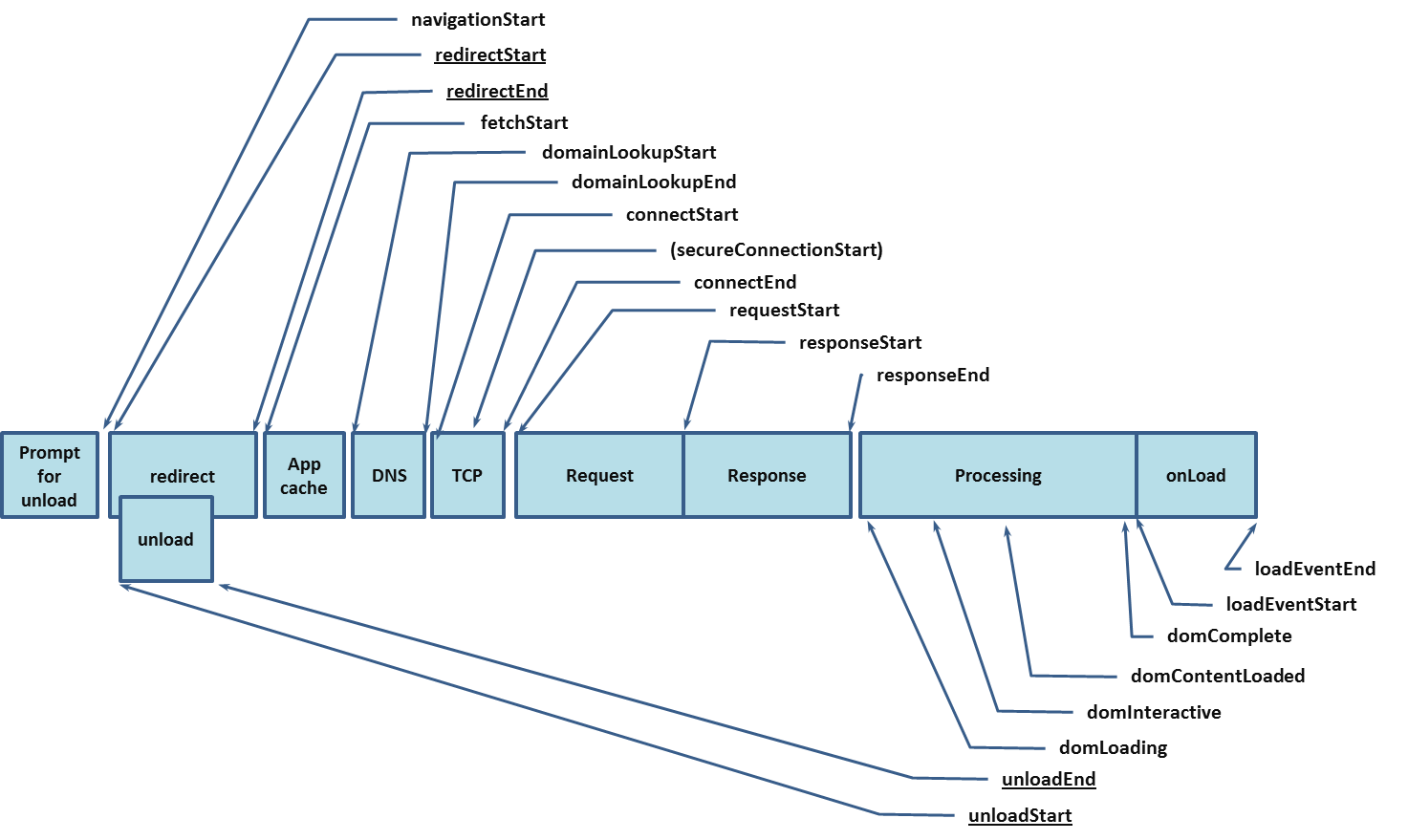
Image source: https://www.w3.org/TR/navigation-timing/#processing-model
WARNING
window.performance.timingandwindow.performance.navigationcan only be written after thewindowobject is createdwindow.performance.timingandwindow.performance.navigationmay be disabled by the browser, in which case both returnnull
Properties
Access corresponding content timing and navigation through window.performance:
interface PerformanceTiming {
  readonly navigationStart: number;
  readonly unloadEventStart: number;
  readonly unloadEventEnd: number;
  readonly redirectStart: number;
  readonly redirectEnd: number;
  readonly fetchStart: number;
  readonly domainLookupStart: number;
  readonly domainLookupEnd: number;
  readonly connectStart: number;
  readonly connectEnd: number;
  readonly secureConnectionStart: number;
  readonly requestStart: number;
  readonly responseStart: number;
  readonly responseEnd: number;
  readonly domLoading: number;
  readonly domInteractive: number;
  readonly domContentLoadedEventStart: number;
  readonly domContentLoadedEventEnd: number;
  readonly domComplete: number;
  readonly loadEventStart: number;
  readonly loadEventEnd: number;
}
enum NavigationType {
  TYPE_NAVIGATE = 0;
  TYPE_RELOAD = 1;
  TYPE_BACK_FORWARD = 2;
  TYPE_RESERVED = 255;
}
interface PerformanceNavigation {
  readonly type: NavigationType;
  readonly redirectCount: number;
};
interface Performance {
  readonly timing: PerformanceTiming;
  readonly navigation: PerformanceNavigation
}
interface Window {
  readonly performance: Performance
}
WARNING
Note that the Navigation Timing feature has been marked as deprecated and is not recommended for use. However, due to its excellent compatibility (Chrome 6), it's still worth understanding.
Navigation Timing Level 2
Currently on the W3C agenda is the latest Navigation Timing Level 2 standard. In short, compared to Navigation Timing - 2012, this standard mainly introduces:
- More time points and properties
- Protocol support
The usage also differs from Navigation Timing - 2012. You can obtain corresponding properties through performance.getEntriesByType or PerformanceObserver.
performance.getEntriesByType supports multiple resource types. By specifying type, you can retrieve the corresponding performance data:
const [navigationTl] = performance.getEntriesByType("navigation");
const srcTimelines = performance.getEntriesByType("resource");
Note that performance.getEntriesByType does not notify changes to performanceNavigationTiming properties. It returns a FrozenArray format of the current performance timeline at the time of the call. To dynamically monitor changes, use PerformanceObserver:
function perfObserver(list, observer) {
  list.getEntries().forEach((entry) => {
    if (entry.entryType === "mark") {
      console.log(`${entry.name}'s startTime: ${entry.startTime}`);
    }
    if (entry.entryType === "measure") {
      console.log(`${entry.name}'s duration: ${entry.duration}`);
    }
  });
}
const observer = new PerformanceObserver(perfObserver);
observer.observe({ entryTypes: ["measure", "mark"] });
Change details, excerpted from W3C Editor's Draft
Performance interfacemoved to a separate PERFORMANCE-TIMELINE-2 standard- Built on RESOURCE-TIMING-2
- Supports HR-TIME-2
- Supports [RESOURCE-HINTS] prerendering technology
- Exposes redirect count since the last non-redirect navigation
- Exposes next hop network protocol
- Exposes
transferand encoded/decoded request body sizes - Mandates the
secureConnectionStartproperty
Level 2 Processing Model
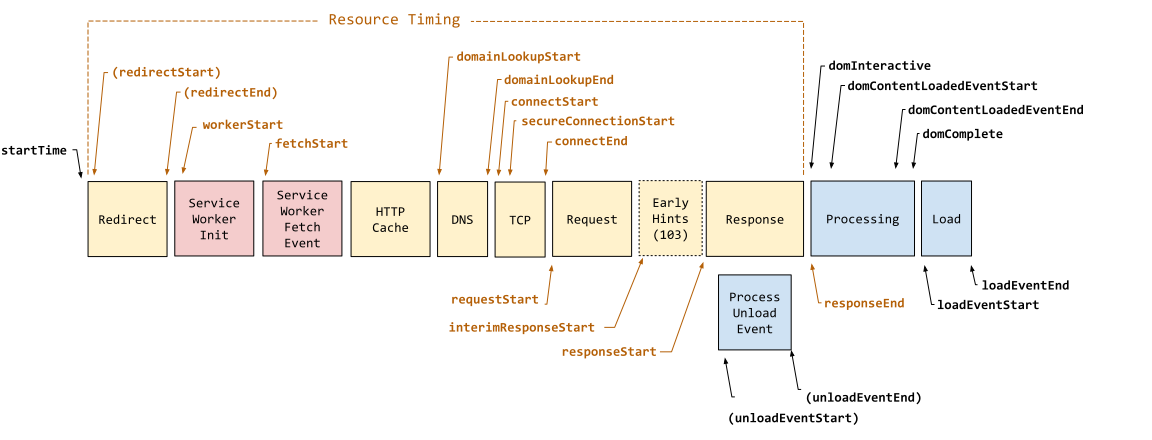
- Navigation start: Records
startTimeandnavigationStarttime points Service Worker: If a Service Worker exists, records theworkerStarttime point- Redirect processing: If redirects exist, records
redirectStartandredirectEndtime points, and updates theredirectCountproperty DNSlookup: RecordsdomainLookupStartanddomainLookupEndtime pointsTCPconnection: RecordsconnectStart,secureConnectionStart(if applicable), andconnectEndtime points- Request sent: Records the
requestStarttime point - Response received: Records
responseStart,responseEnd,transferSize,encodedBodySize, anddecodedBodySizetime points - Underlying protocol: Records the
nextHopProtocolproperty DOMprocessing: RecordsdomInteractive,domContentLoadedEventStart,domContentLoadedEventEnd, anddomCompletetime points- Page load: Records
loadEventStartandloadEventEndtime points - Prerendering: If prerendering exists, records
prerenderStartandprerenderEndtime points
Comparing with Navigation Timing 2012, Navigation Timing Level 2 clearly has finer granularity and adds features like Service Worker support.
Properties
/** Navigation type */
enum NavigationTimingType {
    "navigate",
    "reload",
    "back_forward",
    "prerender"
};
/** Not restored reasons */
interface NotRestoredReasons {
  readonly src?: string;
  readonly id?: string;
  readonly name?: string;
  readonly url?: string;
  readonly reasons?: {reason: string}[];
  readonly children?: {reason: string}[];
}
interface PerformanceNavigationTiming {
    readonly unloadEventStart: number;
    readonly unloadEventEnd: number;
    readonly domInteractive: number;
    readonly domContentLoadedEventStart: number;
    readonly domContentLoadedEventEnd: number;
    readonly domComplete: number;
    readonly loadEventStart: number;
    readonly loadEventEnd: number;
    readonly type: NavigationTimingType;
    readonly redirectCount: number;
    readonly criticalCHRestart: number;
    readonly NotRestoredReasons?  notRestoredReasons?: ;
}