
Vue Universal Component Library Development
Open source code at https://github.com/X-sky/vue-uni-component
Background
In daily 2B business development, it's inevitable to encounter cross-version frameworks — or even cross-generation frameworks — within a single system. Take a project I previously worked on: it spanned jQuery+LayUI, Vue 2, Vue 2.7, and Vue 3. But as part of the same project, some business components inevitably overlap.
The traditional approach is to migrate existing business components to the new project. But consider this scenario: there's a universal component FeedbackDialog that has already been migrated and is used across all framework versions in the project. That means identical business logic exists in four different frameworks. Now when the product team requests an optimization of the feedback dialog, the development and testing costs are enormous — developers need to modify the component in four frameworks, and testers need to understand which parts of the system use which framework and test accordingly.
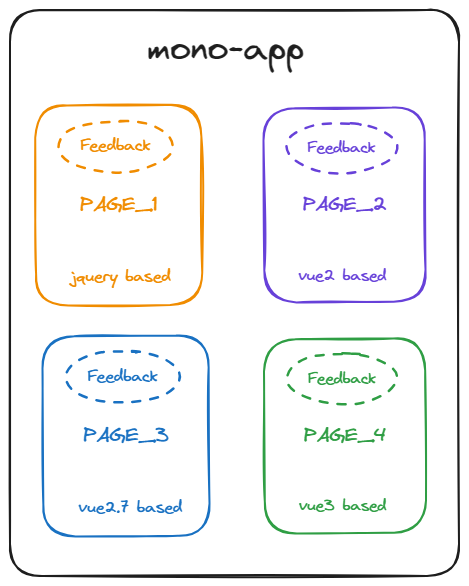
A cross-framework monolith application
If our FeedbackDialog component could avoid redundant development across different frameworks, both development and testing could save tremendous effort, as shown below:
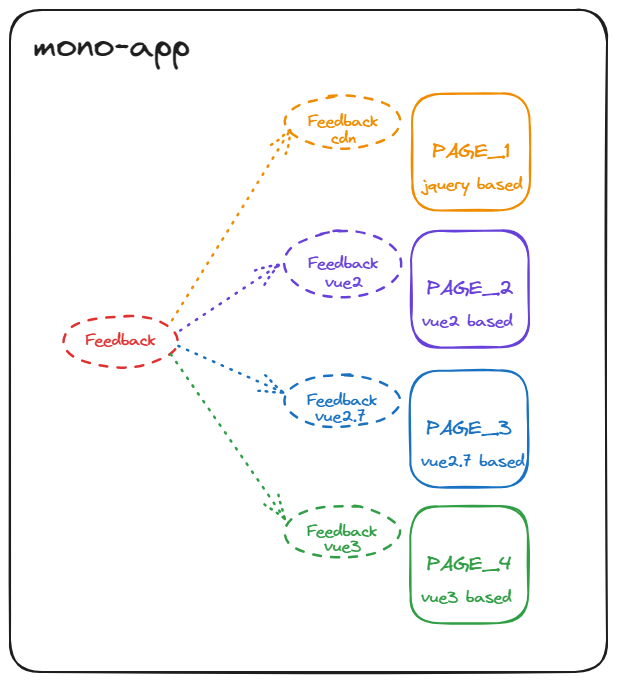
A cross-framework monolith application using universal components
Component Library Development
Vue Component Library Principles
Before developing a component library, we need to understand two questions:
- What is a component?
- What is a component library?
Although we mostly play the role of "package consumer" during development, only by understanding these two questions can we know what we're building.
What is a Component?
The most common thing we work with daily is component development. But first, a clarification: component ≠ SFC. According to the Vue official definition:
SFC is a special file format that allows us to encapsulate the template, logic, and styling of a Vue component in a single file. Vue SFC is a framework-specific file format and must be pre-compiled by
@vue/compiler-sfcinto standard JavaScript and CSS.
Therefore, SFC is just one representation of a Vue component — JSX and render functions are others. But SFC is a great entry point for understanding components — it ultimately gets compiled into standard JavaScript. A compiled SFC is a standard ES module, and Vue's official site also provides an SFC Playground for a more intuitive view of how they're compiled.
So our first question — "What is a component?" — gets a clear answer:
Nothing magic, just JavaScript
What Happens During app.use?
When using various Vue-based plugins/components, we're familiar with this pattern:
// From element-plus docs https://element-plus.org/zh-CN/guide/quickstart.html
// main.ts
import { createApp } from 'vue';
import ElementPlus from 'element-plus';
import 'element-plus/dist/index.css';
import App from './App.vue';

const app = createApp(App);

app.use(ElementPlus);
app.mount('#app');
Or the Vue 2 version:
// From element-ui docs https://element.eleme.cn/2.0/#/zh-CN/component/installation
import Vue from 'vue';
import ElementUI from 'element-ui';
import 'element-ui/lib/theme-chalk/index.css';
import App from './App.vue';

Vue.use(ElementUI);

new Vue({
  el: '#app',
  render: (h) => h(App)
});
So what exactly does .use() do? Checking the Vue 2 .use API and the Vue 3 .use API, we can understand that the magical .use ultimately does one thing: install plugins.
.use accepts either an Object with an install method, or a Function that serves as the install method itself. The install method receives two parameters: the application instance App and plugin options Options. In Vue 2, the first parameter is the global Vue object.
Using Vue 3 as an example, we can find the corresponding type definition in the runtime-core source code:
type PluginInstallFunction<Options = any[]> = Options extends unknown[]
  ? (app: App, ...options: Options) => any
  : (app: App, options: Options) => any;
So when we say "Vue component library development," this phrasing might be too specific. A more general description would be: Vue plugin development.
With that, our second question is also answered:
A component library is a type of plugin
Common Build Tools
Currently, the popular bundling tools in the frontend community are mainly: webpack, rollup, and esbuild. Recently, Rust-based bundlers like rspack and rolldown have also emerged. However, due to ecosystem and stability concerns, they're not suitable for enterprise production. For the same reason, esbuild should also be ruled out — despite being very fast (built with Go), its ecosystem isn't mature enough and lacks flexibility for our upcoming project.
Although webpack should be the priority for stability, it's actually not ideal for component library bundling. Or rather, using webpack to bundle component libraries is cumbersome because webpack bundles all dependencies into the output by default, requiring many extra configurations to get proper distribution results.
Moreover, given the Vue ecosystem's development trend, embracing vite is almost inevitable, and vite is natively based on rollup. Therefore, rollup was chosen as the build tool.
Approach Decision
Two paths lay before us when choosing an approach:
- Dispatch mode
- Adaptor mode
Dispatch Mode
Develop using Vue SFC, compile through different version template compilers in the monorepo/container during the build phase. Each container outputs artifacts for different versions.
Theoretically, the template syntax differences between Vue 2 and Vue 3 aren't that large. Vue 2.7 has built-in setup support, and Vue 2 can also achieve syntax-level alignment through @vue/composition-api combined with unplugin-vue2-script-setup.
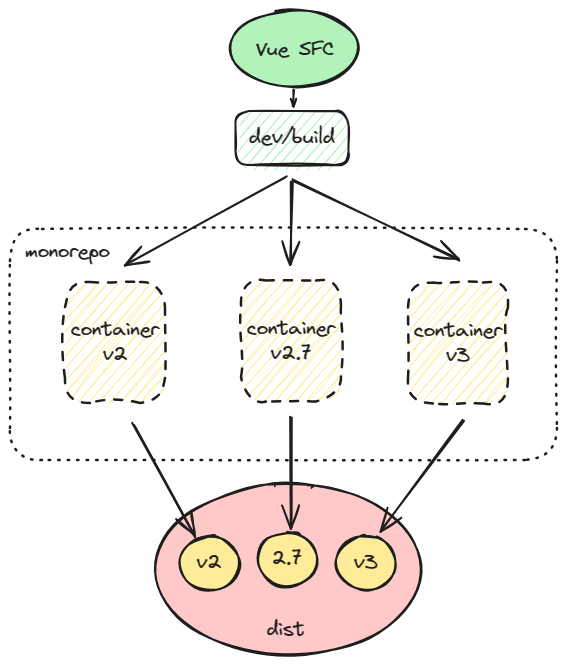
Advantages of this mode:
- Lower development cost — no need to change existing development habits. Team members don't need to understand implementation details to develop
- Compilation targets different versions, with some optimization mechanisms
- Using different
containersfor distribution compilation makes customized configuration convenient - Isolates code for different
Vueversions
Disadvantages:
- Abandons reuse of other component libraries — all components must be built from scratch
- Some syntactic sugar must be abandoned when referencing between components
- If a future
Vueversion breaks the current SFC mode or introduces new features, the repository cannot continue updating (e.g., thedefineOptionssyntactic sugar isn't provided byunplugin-vite-script-setup, so we can only abandon it or submit a PR to that repository)
TIP
Compared to my demo example, there are now more mature open-source libraries using similar ideas. See tiny-vue. Although it doesn't use monorepo for distribution, it uses a similar concept of compile-level distribution and transpilation for different Vue versions.
Adaptor Mode
Define a built-in adaptor-runtime syntax, develop using custom template syntax, and finally bundle a single set of artifacts with different version runtime-adaptors. In the application, use the adaptor to adapt to different Vue versions.
The initial idea was similar to the approach used when converting mini-programs to ArkUI — develop using Vue-like template syntax, separately develop an adaptor-runtime layer, and ultimately use different runtimes based on the user's Vue version.
Advantages:
- No need for multiple compilations — multiple Vue versions use the same artifacts, further reducing business-layer code differences
- The
runtime-adaptorapproach has extremely strong extensibility. Theoretically, this approach could even adapt to other component libraries likeelement-plus, or even other frameworks likereact, achieving "write once, use everywhere" - Both the compilation layer and runtime are controlled internally by the component library, offering more control compared to the dispatch mode's delegation to
vue/template-compilerandruntime/core
Disadvantages:
- Extremely high development cost. The team needs to implement a
DSL; if using standardTSX, team members need to learnTSX. Additionally, differentadaptor-runtimesneed to be implemented for different target outputs - The
runtime-adaptorintroduces runtime performance overhead
Undoubtedly, for independent development, building a universal component library in this mode is nightmare difficulty.
PS. By the time I saw this article, the component library was already basically built using the dispatch mode. Moreover, the JSX transform mode it uses requires understanding both the differences between Vue versions and the TSX workflow and output, so it was never in the selection range.
Decision
Considering the component library's use cases, combined with team size and long-term maintenance complexity, the dispatch mode was ultimately chosen for development.
Repository Structure
Using
monorepoto implement thedispatch mode
Multi-Version Template Compilation Support
When it comes to multi-version Vue support, vue-demi is unavoidable. vue-demi is a small utility developed by Vue core team member antfu that supports forwarding Vue code references. VueUse internally uses vue-demi to support multiple Vue versions.
However, since vue-demi only forwards Vue versions, pure JS library development (like @vueuse/core) doesn't need to worry about template parser conflicts. Component library development, however, must address this issue because different Vue versions use different template compilers:
- vue3.x: vue/compiler-sfc
- vue2.7.x: vue/compiler-sfc@2.7
- vue2.x: vue-template-compiler
Predictably, even using render functions, we can't avoid version issues. So it's better to solve this problem at the compilation stage. Using pnpm's monorepo mode, we can create three different Vue repositories, each with their own package.json and vite.config.ts configurations, compiling component artifacts for multiple Vue versions.
- containers/v2 -> @vue-uni-ui/v2
- containers/v2.7 -> @vue-uni-ui/v2.7
- containers/v3 -> @vue-uni-ui/v3
By configuring resolve.alias in vite.config.ts, we manually map vue and vue-demi versions to the corresponding repositories. For example, the alias configuration in containers/v3's vite.config.ts:
export default {
  resolve: {
    alias: {
      vue: resolve(
        __dirname,
        'node_modules/vue3/dist/vue.runtime.esm-browser.js'
      ),
      'vue-demi': resolve(ROOT_DIR, 'node_modules/vue-demi/lib/v3/index.mjs')
    }
  }
};
Theoretically, this achieves container isolation for different versions.
However, there's a potential issue: vue-template-compiler's vue dependency isn't explicitly specified in peerDependencies. Because the vue version must exactly match the vue-template-compiler version, vue-template-compiler only performs a check at the top of its index.js:
try {
  var vueVersion = require('vue').version;
} catch (e) {}

var packageName = require('./package.json').name;
var packageVersion = require('./package.json').version;
if (vueVersion && vueVersion !== packageVersion) {
  var vuePath = require.resolve('vue');
  var packagePath = require.resolve('./package.json');
  throw new Error(
    '\n\nVue packages version mismatch:\n\n' +
      '- vue@' +
      vueVersion +
      ' (' +
      vuePath +
      ')\n' +
      '- ' +
      packageName +
      '@' +
      packageVersion +
      ' (' +
      packagePath +
      ')\n\n' +
      'This may cause things to work incorrectly. Make sure to use the same version for both.\n' +
      'If you are using vue-loader@>=10.0, simply update vue-template-compiler.\n' +
      'If you are using vue-loader@<10.0 or vueify, re-installing vue-loader/vueify should bump ' +
      packageName +
      ' to the latest.\n'
  );
}
This means that if multiple vue repositories are installed, the vue package actually referenced by vue-template-compiler is uncontrollable. With pnpm, since vue-template-compiler has no internal dependency declaration, pnpm-lock.yaml has no related dependency binding, so require('vue') entirely depends on the vue version in the .pnpm store. My testing showed that Windows basically throws errors while Mac doesn't. But development environments can't rely on luck. You can use pnpm's pnpm.packageExtensions setting to force dependencies. Add the following code to the root package.json to add a dependency to vue-template-compiler:
"pnpm": {
  "packageExtensions": {
    "vue-template-compiler": {
      "peerDependencies": {
        "vue": "~2.6.14"
      }
    }
  }
}
Note: The ~2.6.14 here must match the vue-template-compiler version in containers/v2.
Additionally, we modify the related VUE_LIB code in path.ts, mapping alias to the internal vue of containers and mapping vue-demi directly to the corresponding vue-demi/lib internal index.mjs. This achieves complete dependency decoupling. The root-level vue is only responsible for @vue-uni-components related repository development, while dev and build are handled by containers' internal dependencies.
Style Support
By compiling corresponding templates within different containers, we can already compile style files through the corresponding compiler. There are typically two issues when designing component library styles:
- How to design unified styles to:
- Facilitate style sharing between components
- Ensure component styles aren't affected by external CSS resets
- How to design the structure so users can customize styles
Currently, mainstream component library style designs all affect the global scope. For example:
Vuetify's _reset.scsselement-plus's reset.scssarco-design's normalize.less
These component libraries are used globally and may be mutually exclusive. Vuetify provides corresponding SCSS variables for manually disabling the reset.
However, given the use case of our Vue universal component library, global reset-css may not be usable, so we also need to consider providing configuration options to determine whether reset is needed during usage.
Additionally, the above libraries all use CSS variables for unified component styling and custom theme settings during usage.
Vuetify- arco-design
But there are several drawbacks:
- Cannot integrate with JS. If the UI involves chart libraries like
echarts, theme color variables must be additionally maintained in JS - Overwriting and resetting involve multiple configurations, and
Vuetifyeven has two sets of theme colors (configandscss) to maintain - If you want to use the component library's design specifications (like palette, font specs, etc.) without using the components themselves, you must dive into
node_modulesor source code to understand each CSS variable name
Therefore, we consider a workflow:
- During development, define CSS variables through JS, and use variable names internally in components
- During usage, register CSS variables during hook initialization while exposing variables for libraries like
echarts. With TypeScript support, variable name hints can even be provided
Component Library Debugging
Source Code Debugging
The three scripts pnpm dev:3, pnpm dev:27, and pnpm dev:2 can run simultaneously. Within each container, resolve will resolve dependencies to the correct addresses.
Note: When writing test cases and during development, some syntax differs between Vue 2 and Vue 3 parsing, so more universal syntax is needed. For example, two-way attribute binding: in Vue 2, the template syntactic sugar is :visible.sync; in Vue 3, it's v-model:visible. Therefore, the universal approach is:
<script>
import { ref } from 'vue-demi';
const visible = ref('false');
const updateVisible = (v) => {
  visible.value = v;
};
</script>
<template>
  <uni-dialog :visible="visible" @update:visible="updateVisible"> </uni-dialog>
</template>
If we need to hand-write a test component inside the container every time, including CDN debugging, we'd need to write nearly identical components four times. Therefore, using the universal syntax above, we can consider adding a test component repository @vue-uni-ui/components-test. Write test components in this repository, then remove each container's dependency on @vue-uni-ui/components in containers, replacing it with the test repository dependency, and reference the corresponding test components. We also need to supplement scripts to automatically create corresponding test component templates during ui:create, avoiding the mental burden of manual creation.
About @vue-uni-ui/components-test
Although the ui:create command was added for automated creation to reduce mental burden during subsequent development, in practice, developers may not follow the development documentation. Over-reliance on script commands is also a bad practice in team collaboration. Perhaps commit-time validation or simplified development workflows are needed to prevent different developers from leaving completely different project structures.
After integrating unit-test and e2e test, the components-test package will be removed from the codebase.
Artifact Debugging
This debugging is only needed during the development phase. Theoretically, once the framework is set up, not every artifact needs to be debugged. As long as compilation succeeds, all artifacts will contain the same business logic.
mjs
link:local script. First link the corresponding dependencies inside the artifact, then globally link the corresponding dependencies.
CDN
CDN artifact debugging is relatively simpler. After pnpm build, execute pnpm dev:cdn. The pnpm dev:cdn command automatically copies iife.js, style.css, and other files to the corresponding folders and runs vite for debugging. Debug multiple version artifacts by commenting different versions of vue and their corresponding content in the cdn-playground/index.html file.
⚠Attention: In CDN mode debugging, custom components have two caveats, which are also HTML standard limitations:
- Self-closing tags cannot be used
<!-- Works, but only renders the first custom component -->
<uni-template />
<!-- Won't work -->
<uni-dialog />- PascalCase component names cannot be used
<!-- HTML will convert the component name by default, equivalent to unitemplate. Since our registered name is UniTemplate, both UniTemplate and uni-template work. But unitemplate won't match -->
<UniTemplate />
Issue Log
About Modularization
// exportLib.js export
const foo = () => {};
export { foo };
// Usage
import { foo } from 'exportLib.js';
foo();
// Usage 2
import * as exportLib from 'exportLib.js';
exportLib.foo();// Export
const foo = () => {};
export { foo };
export default {
foo
};
// Usage
import exportLib, { foo } from 'exportLib.js';
exportLib.foo === foo; // trueWith the first approach, imports become somewhat verbose. But with the second export approach, when exporting as CDN or UMD, accessing the overall object requires using .default:
<script src="./exportLib.iife.js"></script>
<script>
  __GLOBAL_EXPORT_LIB__.default.foo();
  __GLOBAL_EXPORT_LIB__.foo();
</script>
So we optimize based on the first export approach:
// exportLib.js export
const foo = () => {};
const defaultExport = {
  foo
};
export { defaultExport as default, foo };
// Usage
import exportLib, { foo } from 'exportLib.js';
foo();
Of course, this means import * as exportLib from 'exportLib.js' will include default. There's no way to accommodate everything — optimization must be based on specific use cases.
About Creating Service-Style Components
Vue 2 and Vue 3 have different render modes. Vue 3 has a corresponding appContext for each component, and you can create custom rendering through customRender. element-plus's MessageBox uses this approach, mounting components via the render function when called through API. (render is a function created internally by Vue using createRenderer).
However, Vue 2's single-instance mode means it won't have appContext or APIs like render. Therefore, new instances can only be created through Vue.extend(comp). As a result, the useComponentService function in our util must use vue-demi's isVue2 field for conditional logic, causing output code redundancy.