
About Text Justify Alignment
The CSS property text-align:justify is used to justify inline content within a box relative to the parent element. In most cases, simply using it achieves the desired effect. However, there are two things to note:
- Single-line text cannot be justified
- It may not work on iOS
Single-Line Text Alignment
When text content is only one line, text-align does not process the last line of inline elements. Therefore, text-align: justify appears as if it has no effect.
The text-align-last Property
In this case, you can add text-align-last: justify to force the last line to also be justified.

Drawback: text-align-last: justify is not supported in Safari versions below 16 (Released 2022-09-12).
Pseudo-elements
To achieve an effect similar to text-align-last: justify, you can also add a pseudo-element to force the text to wrap, turning it into multi-line text:
<style>
  .test-div {
    margin: 10px;
    text-align: justify;
    border: 1px solid #ccc;
    width: 200px;
    line-height: 1.5;
    padding: 10px;
  }
  .test-div::after {
    display: inline-block;
    content: '';
    width: 100%;
    height: 0;
  }
</style>
<div class="test">测试只有单行的内容 </div>Drawback: This causes the container to have an extra line height (as shown below), requiring additional handling.

So in practice, this approach has limited use — it's basically only needed when form label content needs to be justified. For multi-line text display, forcibly stretching all text doesn't look good visually (as shown below):

JavaScript Implementation
If you don't mind the extra work or don't want to deal with the side effects of the pseudo-element compatibility approach, another solution is to split all text characters, wrap each in a span, set the parent element to flex layout with justify-content: space-between, which also achieves the effect:
<style>
  form {
    margin: 10px;
    padding: 10px;
    width: 300px;
    border: 1px solid #ccc;
  }
  .form-item {
    display: flex;
    align-items: center;
  }
  .form-item-label {
    display: flex;
    align-items: center;
    justify-content: space-between;
    width: 80px;
    margin-right: 10px;
  }
</style>
<form>
  <div class="form-item">
    <label class="form-item-label align-justify" for="user-name">姓名</label>
    <input id="user-name" />
  </div>
  <div class="form-item">
    <label class="form-item-label align-justify" for="address">居住地</label>
    <input id="address" />
  </div>
</form>
<script>
  const elList = Array.prototype.slice.call(
    document.getElementsByClassName('align-justify')
  );
  elList.forEach((el) => {
    const wrappedContent = el.textContent
      .split('')
      .map((char) => `<span>${char}</span>`);
    el.innerHTML = wrappedContent.join('');
  });
</script>Drawback: The main drawback is wasted performance and limited scenarios. The prerequisite is additional script computation and element manipulation. When text content is very large, both the computation and re-insertion will burden the page.
Multi-line Text Issues on iOS
In real business, there's a common scenario where users upload long text in a backend management page. The text content contains special characters like \n, \r, and spaces, and the actual page display needs to correctly show line breaks.
<style>
  .test {
    margin: 10px;
    text-align: justify;
    border: 1px solid #ccc;
    width: 200px;
    line-height: 1.5;
    padding: 10px;
  }
</style>
<div class="test" id="test"></div>
<script>
  const serverData =
    '   测试不止,一行的内。容测试*不止.一行测试不123止一行的内容测试不止一行测试不止一行的内容测试不止一行的内容\n  多行换行展示文本';
  document.getElementById('test').textContent = serverData;
</script>
As you can see, the text is indeed justified, but line breaks and spaces are not displayed correctly.
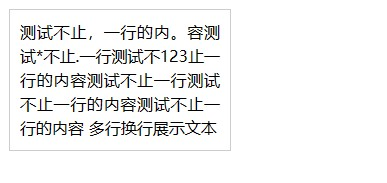
The natural thought is to use the white-space: pre-wrap property:
.test {
     margin: 10px;
     text-align: justify;
+    white-space: pre-wrap;
 /*code omitted*/
}
Then both line breaks and justify alignment can be achieved. Indeed, on the web this seems to solve the problem — ensuring both justify alignment and correct text formatting (as shown below):

However, this approach does not achieve justify alignment on iOS (as shown below):
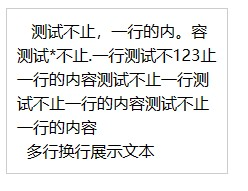
Most online answers describe the first scenario's problem. Neither adding pseudo-elements nor text-align-last can achieve the ideal case of "justify alignment with the last line not stretched" on iOS.
white-space on iOS
TL;DR: pre, pre-wrap, and break-spaces all affect the effectiveness of text-align:justify
I found an answer on Stack Overflow about how to justify text in Firefox and Safari. The answer states that white-space:pre-wrap conflicts with text-align: justify, preventing text justify alignment.
This raises a series of new questions: Why does Android work fine while white-space:pre-wrap conflicts with text-align: justify on iOS? If text-align: justify conflicts with white-space: pre-wrap, do other white-space values also conflict? The answer to why Android works fine is easy to guess — the two platforms use different layout engines. For more on this, see the article on browser engines. We can answer the remaining questions through comparative testing.
So I chose three similar properties for comparison testing (preserve line breaks / preserve spaces):
- pre-wrap
- pre-line
- break-spaces
The reasons for not testing other properties are:
predoesn't perform inline-formatting, meaning it won't auto-wrap inline text. Discussing justify alignment in this case is meaningless.nowrap— same reasonnormalas the default value was already working when we hadn't addedwhite-space: pre-wrap
From the test results, text-align: justify only works correctly when white-space: pre-line is used. Of course, this introduces a new problem: the spaces in the original data are not displayed correctly (as shown below): 
Let's set aside the space issue for now. First, we need to consider why among all white-space options, only pre-line works. Referring to the W3C Draft:
pre-wrap: Likepre, this value preserves white space; but likenormal, it allows wrapping;
break-spaces: The behavior is identical to that ofpre-wrap, except...
pre-line: Likenormal, this value collapses consecutive white space characters and allows wrapping, but it preserves segment breaks in the source as forced line breaks
From the definitions, we can understand that although pre-line and pre-wrap both have the pre-* prefix, their behaviors differ.
pre-line is closer to normal, preserving segment breaks on top of that, while pre-wrap and break-spaces are closer to pre, preserving wrapping.
So we can now identify the reason for the disappearing spaces after changing to white-space: pre-line. Since pre-line is 'like normal', according to normal's definition:
This value directs user agents to collapse sequences of white space into a single character (or in some cases, no character)
So according to the W3C definition, spaces disappearing under pre-line is the expected behavior. To implement text-align: justify on iOS, there are two approaches:
- Transform the problem into "how to preserve spaces and line breaks under
white-space: normal", then usetext-align: justifyfor justify alignment - Keep
white-space: pre-wrap, use JS to calculate the number of lines based on width, and adddisplay:flex; justify-content: justify-betweento each line, while keepingjustify-content:flex-startfor the last line
Here we'll only implement the first approach. The second approach is neither necessary nor reliable, because JS calculations cannot guarantee identical whitespace parsing across all browsers. After all, whitespace is "in some cases, no character." Since user-side text input is received through a regular textarea, crude conversion to half-width characters could cause inconsistency between user input and actual display. But without whitespace conversion, long text cannot be split into "multiple single-line texts" forming multi-line text. Therefore, this method should not be adopted at the business level.
iOS-Compatible Text Alignment Implementation
For simple requirements (non-rich-text, non-interactive, display-only), the implementation is to replace spaces and line breaks with HTML tags, then change the page generation method from rendering text via textContent to rendering content via innerHTML:
<style>
    .test {
      margin: 10px;
  +   white-space: pre-line;
      text-align: justify;
      border: 1px solid #ccc;
      width: 200px;
      line-height: 1.5;
      padding: 10px;
    }
  + .whitespace-pre-wrap {
  +   white-space: pre-wrap;
  + }
</style>
<div class="test" id="test"></div>
<script>
    const serverData =
      '      测试不止,一行的内。容测试*不止.一行测试不123止一行的内容测试不止一行测试不止一行的内容测试不止一行的内容\n    多行换行展示文本';
    /**删除所有tag */
  + const stripAllTags = (str) => {
  +   if (!str) return '';
  +   return str.replace(/<.*?>/g, '');
  + };
    /**将空格替换为带span标签的空格 */
  + const placeWhiteSpaceSpan = (str) => {
  +   if (!str) return '';
  +   // 注意这里的span又带上了white-space: pre-wrap的属性
  +    return str.replace(/x20/g, '<span class="whitespace-pre-wrap"> </span>');
  + };
  -  document.getElementById('test').textContent = serverData;
  +  document.getElementById('test').innerHTML = placeWhiteSpaceSpan(
      stripAllTags(serverData)
    );
</script>
Compared to the original problem code, there are three things to note:
- When replacing spaces with
<span>, the character inside must be a space, and the span needs thewhite-space: pre-wrapproperty. This ensures the browser interprets spaces correctly. If we replace with<span style="opacity: 0">1</span>, the resulting whitespace won't match the actual spaces the user entered, because the browser's interpretation of spaces in long text is not one space per half-width character. If we fill everything with half-width characters, the browser will display them as actual text rather thanwhite-space. Especially when spaces cause line breaks, unexpected issues may arise. Therefore, the<span>still contains a space internally, and thespanitself is set towhite-space: pre-wrapto preserve spaces. - The
white-space: pre-lineproperty was added tostyle. In fact, once we start using JS to replace whitespace and line break characters, we could skip this property entirely and replace line breaks with<br />to achieve the same effect. - Before
placeWhiteSpaceSpan,stripAllTagsis called. Because directly using user input text asinnerHTMLposes significant XSS risks, this function strips all text containing <> to prevent XSS attacks. Of course, this is the simplest and most crude approach — in real business scenarios it might "accidentally remove" user input text, but this is just an example. XSS is a separate topic that we won't expand on here.
In summary, for very complex text involving \n, \r, \t, spaces, and other symbols, or multi-language mixed content, you need to estimate the development cost versus return. Mobile compatibility is a complex issue, and if you follow the span replacement method described above, too many spaces could also affect rendering performance. Therefore, if it's not a hard requirement, try to avoid justify alignment. However, without justify alignment, extra attention should be paid to leaving enough padding on curved screens to prevent text from extending beyond the edges.
If there's a strong requirement for complex text input with special styling and interactions on the output side, consider rich text development with a dedicated system.